Instagram Transcript Generator
Reel to text, script and SRT
Paste a public Reel link. Get the spoken words as clean paragraphs or timed lines, plus the post's caption.
Paste a Reel link
How to get the transcript of an Instagram Reel
Copy the Reel link
In the app, tap the Share icon (➤) on the Reel, then Copy link.
Paste it here
Paste the link in the box above and press Get transcript.
Read, copy or download
Switch between Script and Transcript, then copy the text or download a file.
On a computer
Open the Reel and copy the address from your browser's address bar — it looks like instagram.com/reel/…. Paste it in the box above.
The link may end with ?igsh=… or ?vrfl=…. That's fine — paste it as it is. You don't need to download the video or log in to Instagram.
What you get from one Reel
Example: one demo video, four formats
Shows: One 24-second demo as a script, timed lines, a caption and an SRT file.
This demo isn't posted on Instagram yet, so this text wasn't made by pasting a link. It comes from the video's script and voice timings, laid out with the tool's own formatting. The caption is the one we wrote to post with it.
Script
What was said, as paragraphs you can paste anywhere. It opens first.
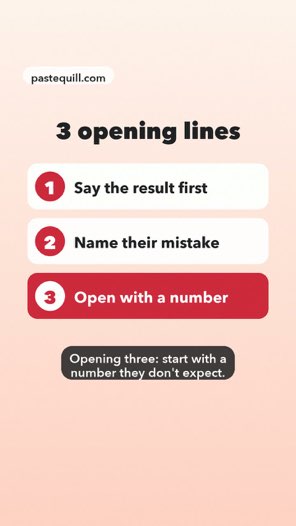
Stop scrolling if your Reels die after three seconds. It's not the algorithm. It's your first line. Opening one: say the result before the story. Opening two: name the mistake your viewer is making right now. Opening three: start with a number they don't expect. Save this, and try one tomorrow.
Transcript
The same words line by line with timestamps, for finding a moment.
- 0:00 Stop scrolling if your Reels die after three seconds.
- 0:04 It's not the algorithm. It's your first line.
- 0:07 Opening one: say the result before the story.
- 0:11 Opening two: name the mistake your viewer is making right now.
- 0:15 Opening three: start with a number they don't expect.
- 0:20 Save this, and try one tomorrow.
Caption
Copied as is from the post.
3 opening lines for Reels that hold past the first three seconds. Save this for your next shoot.
SRT
A subtitle file video editors can import. The plain words also download as TXT.
1
00:00:00,300 --> 00:00:03,827
Stop scrolling if your Reels die after three seconds.

2
00:00:04,177 --> 00:00:06,864
It's not the algorithm. It's your first line.
Music-only Reels
No one speaks, so there's nothing to transcribe. PasteQuill says so instead of making text up, and shows the post's caption if it has one. It still uses one of today's free AI transcripts.
Does Instagram have transcripts?
No. Instagram doesn't give you a transcript you can copy. Some Reels show captions on screen while they play, and the text under a post is the caption the creator typed — not what was said in the video. PasteQuill turns the spoken words into text, with timestamps.
| Instagram app | PasteQuill | |
|---|---|---|
| See what was said | On screen, if captions are on | Full text |
| Copy the words | No built-in way | Yes |
| Download TXT / SRT | No | Yes |
| Timestamps | No | Every line |
| Reels without captions | Nothing to read | Text from the audio |
What people use Instagram transcripts for
Study a hook
Read the first lines of a Reel that worked and see how it opens.
Three ingredients, five minutes, no oven. Here's the trick nobody tells you. 0:00–0:03
In your result: Script
Rewrite it as your own script
Keep the structure, not the words.
Original: "Three ingredients, five minutes, no oven."
Yours: "Dinner in five minutes — and you won't turn the oven on."
In your result: Copy text
Give a Reel to ChatGPT or Claude
AI chat apps usually can't open an Instagram link. Copy for ChatGPT gives them the caption and the transcript, with a request to summarize.
Summarize it in five bullet points.
Caption: … Transcript: …
In your result: Copy for ChatGPT
Translate it
Paste the script into a translator or an AI chat.
EN: "Three ingredients, five minutes, no oven."
ES: "Tres ingredientes, cinco minutos, sin horno."
In your result: Script
Add subtitles to your own Reel
Load the SRT file into your video editor.
2
00:00:02,100 --> 00:00:04,000
Three ingredients, five minutes, no oven.
In your result: Download SRT
Quote it accurately
For research, journalism or notes, with the time of each line.
"Here's the trick nobody tells you." — @sample.creator, 0:04
In your result: Transcript
Examples are illustrations.
Rules, limits and help
Which Instagram links work
Works
- Reelsinstagram.com/reel/…
- Video postsinstagram.com/p/…
- Links that start with a usernameinstagram.com/<name>/reel/…
- Links copied from the appShare → Copy link gives you one of the forms above.
Doesn't work — and what to do
- StoriesPasteQuill can't read them.
- Private or followers-only postsOnly public posts can be read.
- Photo-only postsThere's no video to transcribe.
- Profile linksOpen a single Reel and copy its link.
- Links with /share/Open the link in your browser, then copy the address from the address bar.
- Posts with several photos or videosThey may not open. If yours doesn't, try the link of a single Reel.
Free limits, accuracy and privacy
- Free3 a day
Free AI transcripts. The count starts over at 00:00 UTC.
- Max length3 min
Longest Reel on the free plan.
- LanguageAuto-detected
No need to pick one.
- AccuracyBest on clear speech
Loud background music can lower it.
- Saved for24 hours
Copy or download before then.
- PrivacyNo Instagram login
PasteQuill never asks for your Instagram account and doesn't like, follow or message anyone.
If it doesn't work
| You see | Why | What to do |
|---|---|---|
| A message that the link can't be read | It isn't a link to one public Reel or video post, such as a profile, a Story or a /share/ link. | Copy the link of a single Reel. See Which links work. |
| A message that the video can't be opened | The post is private, deleted, or not a video. | Check that it opens in a browser where you're logged out of Instagram. |
| A note that there's no speech | The Reel is music or silence. | See Music-only Reels above. |
| A message that the audio couldn't be reached | Instagram didn't let PasteQuill get the audio this time. | Try again later. This one won't use up a free transcript. |
| A message that today's free transcripts are used up | You've reached the daily free limit. | See Free limits for when it starts over. |
Looking for something else?
Just the caption?
It's in your result under Caption, when the post has one.
The audio or video file?
PasteQuill doesn't download Instagram media.
Captions on your own Reel?
That's a setting in Instagram.
Instagram transcript FAQ
Using it
Why is the transcript different from the captions on the video?
Captions shown on a video can be shortened, edited or missing. The transcript is made from the audio, so it follows what was said.
Does it work on iPhone and Android?
Yes, in your phone's browser. Copy the link in the Instagram app and paste it here.
Can I paste several links at once?
No, one link at a time. Each Reel gets its own result.
Limits
Can I transcribe someone else's Reel?
Yes, if it's public. If you plan to republish what someone said, ask the creator first.
Accuracy
Can it tell who is speaking?
No. The transcript doesn't label speakers.
Price
Is it free?
Yes. Free AI transcription covers public Reels up to 3 minutes, three a day. Pro raises the limits.
Turn your next Reel into text
Paste a link and get the words in a few clicks.
Not affiliated with Instagram or Meta.